Start with one hunt.
Connect your files, save a session and see your results.
- 01
Sign in and add your character
Open Web or Desktop and sign in with the same account. Add your Tibia character name.
- 02
Connect your hunt-log folder
In Settings, select the folder where Tibia saves hunt analyzer logs. Connect your screenshot folder if you use Screenshot Studio.
- 03
Save a hunt and review the results
Reset Tibia's Hunt Analyser before a hunt and choose Save to file at the end. Open Hunts in TibiaNexus to review it.
Original logs and screenshots stay on your PC. In Web, reconnect folders after reopening or reloading the page.
Connect what you use
Party hunts
Copy the Party Hunt summary in Tibia, then paste it through Add Party Logs in TibiaNexus. Add teammates' logs when available for the complete team session.
Screenshots & stories
Connect your Tibia screenshot folder in Settings. Open Screenshot Studio to find moments, match them to hunts and create a video, GIF or image.
Weekly Tasks
Open Tools → Weekly Tasks and upload a screenshot of your complete board. Review the detected tasks, then open Recommended Route.
Weekly Tasks →Companions & adventures · Full
Open Character → Pets. Choose your companions, form a party of three and select a fighter before each battle. The other two support automatically. Use Companions to choose talents and training; start with Buried Tunnels and work toward later regions. Ascended trials unlock after Infernal Depths.
Tokens & the Shopkeeper
Verify your character, then save eligible hunts from your connected logs. Open Character → Shopkeeper → Rewards & receipts to see earnings and claim eligible earlier hunts. Browse wares, then use Backpack to equip an owned item. Tokens are TibiaNexus rewards, separate from Tibia Coins.
Overlays & Translator · Desktop
These capture tools need OBS Studio. Hunts, Guides and Screenshot Studio do not need OBS.
- In OBS, open Tools → WebSocket Server Settings.
- Enable the server on port 4455, set a password and save.
- Enter that password in TibiaNexus Settings and select Auto Setup.
Auto Setup creates the scene, targets the Tibia window and starts OBS Virtual Camera. Use the manual fields only for a custom port or source.
Get OBS Studio ↗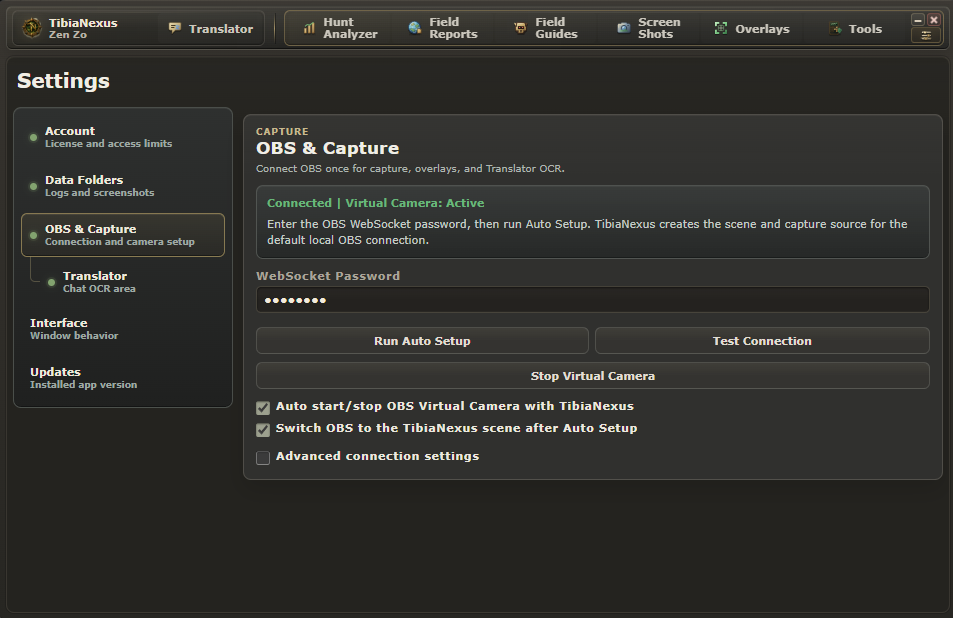
Watch how to save hunt logs
Already have a key?
Sign in, open Account → Already have a key? → Link key. A key linked to another account needs support assistance.
Open Account →